Build a WhatsApp chatbot without writing code
Drag steps onto a canvas, connect them, and switch the flow on. Your bot asks the questions your team asks every day, saves the answers, and hands the chat to a person when it matters.
What is it?
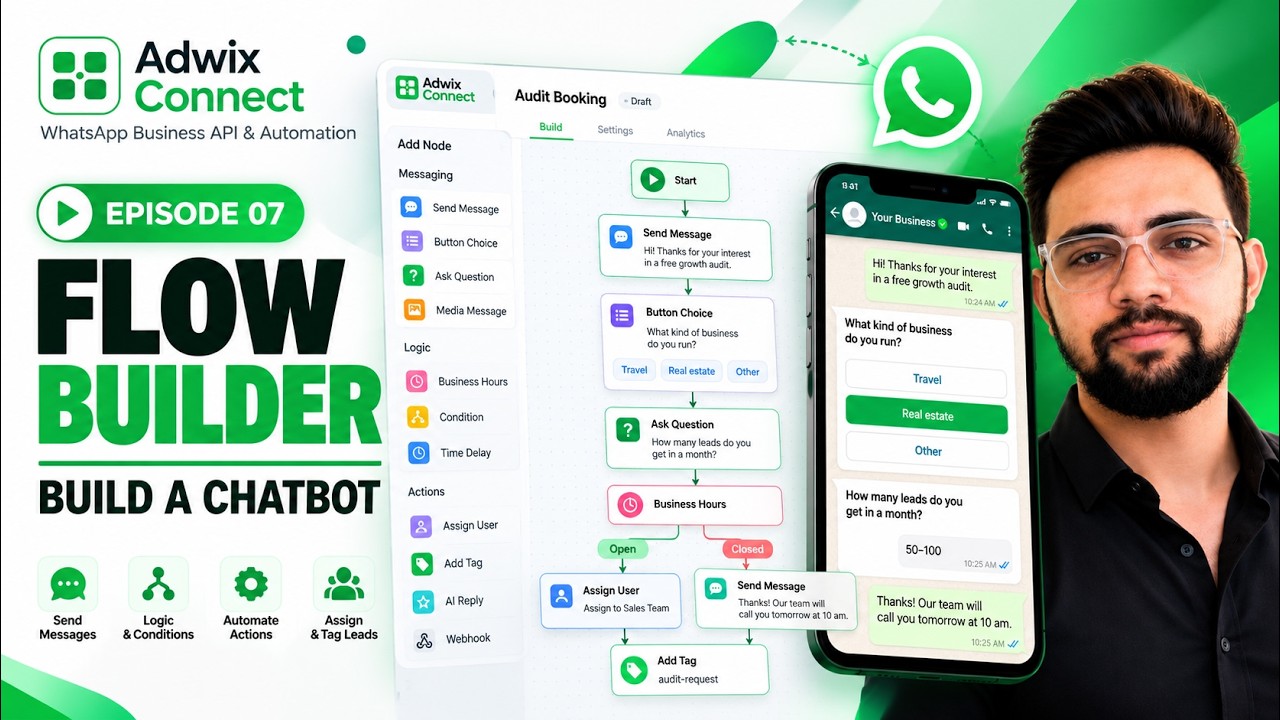
A WhatsApp chatbot is an automated conversation on your business number that offers buttons and menus, asks questions and takes a different path for each answer. Adwix Connect’s Flow Builder lets you draw that conversation as connected nodes — no code — and start it from an automation rule.
What you get
Everything runs on Meta’s official WhatsApp Business API, on your own business number.
Drag-and-drop canvas
Start from one node and add messages, questions and branches. Click any node to configure it.
Buttons and list menus
Up to 3 buttons per message, or a list menu when you need more options. Each choice is its own branch.
Ask and save answers
Expect text, a number, an email, a phone number or a date. Invalid answers are asked again, and answers can be saved to the contact.
Logic nodes
Condition, Business Hours and Time Delay nodes route people differently by answer or time of day.
Products and catalog
Send a product, your catalog or a carousel inside the conversation.
Handover to a person
Assign Team and Assign User nodes pass the chat to your staff, with every answer already collected.
How it works
Which plan includes it
| Feature | Starter · ₹999/mo | Professional · ₹4,500/mo |
|---|---|---|
| Chatbot flow builder | — | Included |
| Webhook node (connect your own tools) | — | Included |
| AI Reply node | — | Included |
| Flow statistics (reach per step) | — | Included |
Plans are billed monthly and you can cancel anytime. Meta’s message charges are separate and billed by Meta, with no markup from Adwix Connect. Compare all plans →
Questions
See the real product before you spend a rupee
Every feature has its own short episode in our tutorial series, recorded inside a live Adwix Connect account.



Build your first flow
Plans from ₹999/month. Billed monthly, cancel anytime.